

Summary: in this tutorial, you’ll learn to use the SQL LIMIT clause to limit the number of rows returned from a query.
Introduction to SQL LIMIT clause
To limit the number of rows returned by a SELECT statement, you use the LIMIT and OFFSET clauses.
Here’s the syntax of LIMIT & OFFSET clauses:
SELECT
  column_list
FROM
  table1
ORDER BY
  column_list
LIMIT
  row_count
OFFSET
  row_to_skip;
In this syntax:
- The
LIMIT row_countdetermines the number of rows (row_count) returned by the query. - The
OFFSET row_to_skipclause skips therow_to_skiprows before beginning to return the rows.
The OFFSET clause is optional. If you omit it, the query will return the row_count rows from the first row returned by the SELECT clause.
When you use the LIMIT clause, it is important to use an ORDER BY clause to ensure the order of rows in the result set.
Not all database systems support the LIMIT clause. Therefore, the LIMIT clause is available only in some database systems such as MySQL, PostgreSQL, SQLite, Sybase SQL Anywhere, and HSQLDB.
If you use SQL Server, you can use the SELECT TOP instead.
SQL LIMIT clause examples
We’ll use the employees table in the sample database to demonstrate the LIMIT clause.

Limiting the number of rows to return
The following query uses the LIMIT clause to return the first five employees sorted by first names:
SELECT
  employee_id,
  first_name,
  last_name
FROM
  employees
ORDER BY
  first_name
LIMIT 5;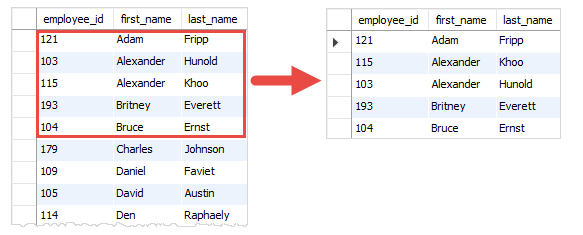
Using an offset
The following query uses both LIMIT and OFFSET clauses to return five rows starting from the 4th row:
SELECT
  employee_id,
  first_name,
  last_name
FROM
  employees
ORDER BY
  first_name
LIMIT
  5
OFFSET 3;
Retrieving the top N rows with the highest or lowest value
You can use the LIMIT clause to get the top N rows with the highest or lowest value.
For example, the following query retrieves the top five employees with the highest salaries.
SELECT
  employee_id,
  first_name,
  last_name,
  salary
FROM
  employees
ORDER BY
  salary DESC
LIMIT 5;
How the query works:
- First, the
ORDER BYclause sorts the employees by salary in descending order. - Second, the
LIMITclause returns five rows from the top of the result set.
To get the top five employees with the lowest salary, you sort the employees by salary in the ascending order instead:
SELECT
  employee_id,
  first_name,
  last_name,
  salary
FROM
  employees
ORDER BY
  salary
LIMIT 5;
Getting the rows with the Nth highest value
Suppose you have to get employees who have the 2nd highest salary in the company. To do so, you use the LIMIT OFFSET clauses as follows.
SELECT
  employee_id,
  first_name,
  last_name,
  salary
FROM
  employees
ORDER BY
  salary DESC
LIMIT 1
OFFSET 1;Output:
 employee_id | first_name | last_name |  salary
-------------+------------+-----------+----------
         101 | Neena      | Kochhar   | 17000.00
How the query works:
- The
ORDER BYclause sorts the employees by salary in descending order. - The
LIMIT 1 OFFSET 1clause gets the second row from the result set.
This query works with the assumption that every employee has a different salary. It will fail if two employees have the same 2nd highest salary.
Additionally, if two or more employees have the same 2nd highest salary, the query returns only the first one.
To fix this issue, you can get the second highest salary first using the following statement:
SELECT DISTINCT
  salary
FROM
  employees
ORDER BY
  salary DESC
LIMIT 1
OFFSET 1;Result:
  salary
----------
 17000.00
And pass the result to another query:
SELECT
  employee_id,
  first_name,
  last_name,
  salary
FROM
  employees
WHERE
salary = 17000;Output:
 employee_id | first_name | last_name |  salary
-------------+------------+-----------+----------
         101 | Neena      | Kochhar   | 17000.00
         102 | Lex        | De Haan   | 17000.00
If you know subquery, you can combine both queries into a single query as follows:
SELECT
  employee_id,
  first_name,
  last_name,
  salary
FROM
  employees
WHERE
  salary = (
    SELECT DISTINCT
      salary
    FROM
      employees
    ORDER BY
      salary DESC
    LIMIT 1
    OFFSET 1);
Summary
- Use the
LIMITclause to limit the number of rows returned by a query. - Use the
OFFSETclause to skip some rows before returning the number of rows specified by theLIMITclause.


