

Summary: In this tutorial, you’ll learn how to use the SQL ORDER BY clause to sort the result set based on values of one or more rows in ascending or descending orders.
Introduction to SQL ORDER BY clause
The ORDER BY is an optional clause of the SELECT statement. The ORDER BY clause allows you to sort the result set by one or more sort expressions in ascending and/or descending order.
Here’s the syntax of the ORDER BY clause:
SELECT
  select_list
FROM
  table_name
ORDER BY
  sort_expression [ASC | DESC];
In this syntax:
- First, specify a sort expression (
sort_expression) in theORDER BYclause based on which you want to sort the result set. Thesort_expressioncan be a table column or an expression that involves a table column. - Second, use
ASCto sort the result set in ascending order andDESCto sort the result set in descending order.
ASC and DESC stand for ascending and descending respectively.The ORDER BY clause uses the ASC option by default. It means that the ORDER BY clause sorts the rows in the result set by the sort_expression in ascending order if you don’t specify either ASC or DESC.
Note that if you don’t specify the ORDER BY clause, the SELECT statement will not sort the result set. It means the rows in the result set don’t have a specific order.
The ORDER BY clause allows you to sort the rows in the result set by multiple expressions. In this case, you need to use a comma-separated list of sort expressions in the ORDER BY clause:
SELECT
  select_list
FROM
  table_name
ORDER BY
  sort_expression_1 [ASC | DESC],
  sort_expression_2 [ASC | DESC];
In this syntax, the ORDER BY clause sorts the result set by the sort_expression_1 first and then sorts the sorted result set by the sort_expression_2.
The database system evaluates the SELECT statement with the ORDER BY clause in the following order:
FROMSELECTORDER BY
Since the database system evaluates the ORDER BY clause after the SELECT clause, you can use column aliases in the ORDER BY clause.
SQL ORDER BY clause examples
We’ll use the employees table in the sample database for the demonstration.

Sorting rows by one column example
The following example uses the ORDER BY clause to sort employees by first names in alphabetical order:
SELECT
  employee_id,
  first_name,
  last_name
FROM
  employees
ORDER BY
  first_name;
Output:

In this example, the ORDER BY clause sorts the rows of the result set by the values in the first_name column.
Sorting rows by multiple columns
The following example uses the ORDER BY clause to sort the employees by the first name in ascending order and the last name in descending order:
SELECT
  employee_id,
  first_name,
  last_name
FROM
  employees
ORDER BY
  first_name,
  last_name DESC;
Output:

In this example, the ORDER BY clause sorts rows by the first name in ascending order, then sorts the sorted result set by the last name in descending order.
Notice the change in the position of two employees: Alexander Khoo and Alexander Hunold in the result set.
Sorting rows by a numeric column example
The following example uses the ORDER BY clause to sort employees by salary from high to low:
SELECT
  employee_id,
  first_name,
  last_name,
  salary
FROM
  employees
ORDER BY
  salary DESC;
Output:

Sorting rows by dates example
Besides the character and numeric data, you can use the ORDER BY clause to sort rows by dates.
For example, the following statement uses the ORDER BY clause to sort the employees by hire dates from earliest to latest:
SELECT
  first_name,
  last_name,
  hire_date
FROM
  employees
ORDER BY
  hire_date;
Output:

To sort the employees by the hire dates in descending order, you can use the following query:
SELECT
  first_name,
  last_name,
  hire_date
FROM
  employees
ORDER BY
  hire_date DESC;
Output:

Sorting NULLs
In SQL, NULL is a marker that indicates missing data or unknown value. NULL is special because you cannot compare it with any value.
If you want to sort rows by a column that has NULL, you can have an option to place NULLs before or after other regular values.
To place NULLs before other values, you use the NULLS FIRST option in the ORDER BY clause:
ORDER BY sort_expression NULLS FIRSTIf you want to place NULL after other regular values, you use the NULLS LAST option:
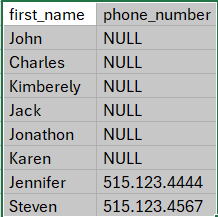
ORDER BY sort_expression NULLS LASTThe following query uses the ORDER BY clause with the NULLS FIRST option to place the NULLs before other values:
SELECT
  first_name,
  phone_number
FROM
  employees
ORDER BY
  phone_number NULLS FIRST;
Output:
The following query uses the ORDER BY clause with the NULLS LAST option to place the NULLs after other values:
SELECT
  first_name,
  phone_number
FROM
  employees
ORDER BY
  phone_number NULLS LAST;
Output:

ORDER BY clause with the NULLS LAST optionSummary
- Use the
ORDER BYclause to sort rows in a result set. - Use the
ASCoption to sort rows in ascending order andDESCoption to sort rows in descending order. - Use
NULLS FIRSTto placeNULLs before andNULLS LASTto placeNULLs after other non-NULL values.


