

Summary: In this tutorial, you will learn how to use the SQL INNER JOIN clause to merge rows from two tables based on a condition.
Introduction to the SQL INNER JOIN clause
The INNER JOIN is an optional clause of the SELECT statement. The INNER JOIN clause allows you to merge rows from two related tables.
Here’s the syntax of the INNER JOIN clause:
SELECT
  column1,
  column2
FROM
  table1
  INNER JOIN table2 ON condition;
In this syntax:
- First, specify the first table in the
FROMclause (table1) - Second, provide the second table you want to merge rows with the first table in the
INNER JOINclause (table2). - Third, define a
conditionfor matching rows between two tables after theONkeyword. This condition is known as a join condition.
For each row in the table1, the INNER JOIN clause examines each row in the table2 and checks the condition.
If the condition is true, the INNER JOIN merges the rows from both tables to form a single row and includes it in the final result set.
Typically, the condition compares values between two columns of the two tables for equality:
SELECT
  column1,
  column2
FROM
  table1
  INNER JOIN table2 ON column1 = column2;
However, the join condition can be any comparison operator, not just an equal operator (=).
If the INNER JOIN requires multiple conditions, you can use the AND operator to combine them.
Understanding SQL inner join
Suppose you have two tables:
- The
Xtable has two columnsid(key) andx. - The
Ytable has also has two columnsid(key) andy.
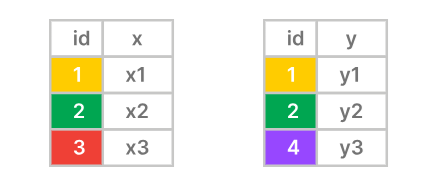
The inner join matches the rows between the X and Y tables using the values in the id columns.
The inner join includes only the rows with matching values in the id columns and does not includes unmatching rows in the result set:
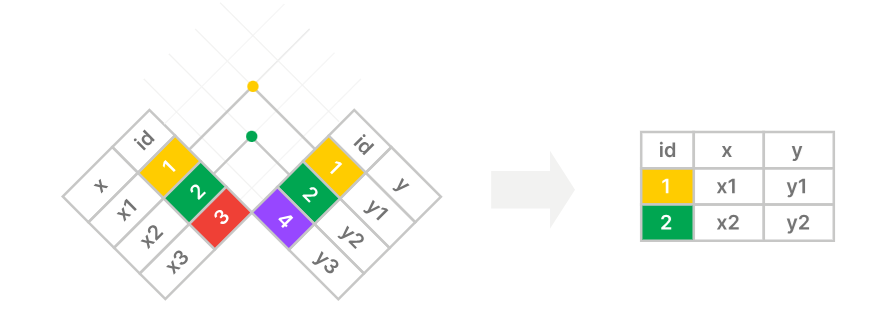
The following Venn diagram is another way to illustrate an inner join:

Essential SQL INNER JOIN example
Suppose we have two tables employees and departments.
The employees table has three columns employee_id, name, and department_id:
| employee_id | name | department_id |
|---|---|---|
| 1 | Jane | 1 |
| 2 | Bob | 2 |
| 3 | Maria | NULL |
The departments table has two columns department_id and department_name:
| department_id | department_name |
|---|---|
| 1 | Sales |
| 2 | Marketing |
The following statement uses an inner join to select data from the employee_id and name from the employees table and department_name from the departments tables:
SELECT
  employee_id,
  name,
  department_name
FROM
  employees
  INNER JOIN departments ON departments.department_id = employees.department_id;
try it here
employee_id | name | department_name
————-+——+—————–
1 | Jane | Sales
2 | Bob | Marketing
How the query works.
- Step 1. The
FROMclause returns all rows from theemployeestable. - Step 2. The
INNER JOINcompares values in thedepartment_idcolumn of theemployeestable with values in thedepartment_idof thedepartmentstable. If they are equal, theINNER JOINclause merge the rows from both tables into a single row. - Step 3. The query return rows with columns specified in the
SELECTclause.
Here’s the break down of the inner join:
The row #1 in the employees table (department_id 1) matches with the row #1 in the departments table (department_id 1):
| employee_id | name | department_id |
|---|---|---|
| 1 | Jane | 1 |
| department_id | department_name |
|---|---|
| 1 | Sales |
The INNER JOIN clause merges the rows from both tables into a single row like this:
| employee_id | name | department_id | department_id | department_name |
|---|---|---|---|---|
| 1 | Jane | 1 | 1 | Sales |
The row #2 in the employees table (department_id 2) matches with the row #2 in the departments table (department_id 2):
| employee_id | name | department_id |
|---|---|---|
| 1 | Bob | 2 |
| department_id | department_name |
|---|---|
| 2 | Marketing |
The INNER JOIN merges the rows from both tables:
| employee_id | name | department_id | department_id | department_name |
|---|---|---|---|---|
| 2 | Bob | 2 | 2 | Marketing |
The row #3 in the employees table does not match with both rows #1 and # 2 in the departments table.
After complete matching all the rows, the INNER JOIN comes up with the following intermediate result sets:
| employee_id | name | department_id | department_id | department_name |
|---|---|---|---|---|
| 1 | Jane | 1 | 1 | Sales |
| 2 | Bob | 2 | 2 | Marketing |
The SELECT clause retrieves the data from the employee_id, name, and department_name columns to form the following result set:
| employee_id | name | department_name |
|---|---|---|
| 1 | Jane | Sales |
| 2 | Bob | Marketing |
Qualifying column names
The following attempts to include the department_id column in the result set:
SELECT
  employee_id,
  name,
  department_name,
  department_id
FROM
  employees
  INNER JOIN departments ON departments.department_id = employees.department_id;
The database system issued the following error:
ERROR: column reference "department_id" is ambiguousThe reason is that both employees and department tables have the same department_id column. The database system does not know which one to select.
To avoid this error, you need to explicitly tell the database system which table you want to retrieve the value from the department_id column.
To do that, you can reference the column using the following syntax:
table_name.column_nameFor example:
SELECT
  employee_id,
  name,
  department_name,
  employees.department_id
FROM
  employees
  INNER JOIN departments ON departments.department_id = employees.department_id;
try it here:
Output:
employee_id | name | department_name | department_id
————-+——+—————–+—————
1 | Jane | Sales | 1
2 | Bob | Marketing | 2
In this example, we explicitly tell the database system to select data from the department_id column of the employees table:
employees.department_idUsing table aliases
SQL allows you to temporarily assign a new name to a table during the execution of a query. This new name is called a table alias.
Here’s the syntax for defining a table alias:
table_name AS table_aliasThe AS keyword is optional, so you can make it shorter like this:
table_name table_aliasWhen referencing a column, you can use the table alias instead of the table name:
table_alias.column_nameIn practice, you often use the table alias when joining tables with the same column names. For example:
SELECT
  employee_id,
  name,
  department_name,
  e.department_id
FROM
  employees e
  INNER JOIN departments d ON d.department_id = e.department_id;
Try it Here:
In this example, we assign the table aliases:
eto theemployeestable.dto thedepartmentstable.
And reference the columns using the table aliases:
d.department_id
e.employee_id
The table aliases make the query more concise.
Joining two tables
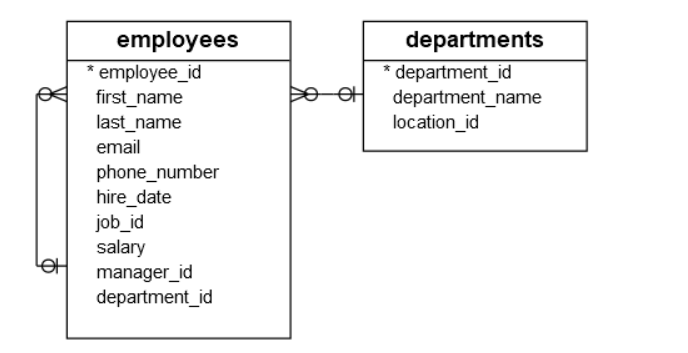
The following example uses an inner join to merge rows from the employees and departments tables in the sample database:
Note that these tables are different from theemployeesanddepartmentsabove.
SELECT
  first_name,
  last_name,
  email,
  department_name
FROM
  employees e
  INNER JOIN departments d ON d.department_id = e.department_id
ORDER BY
  first_name,
  last_name;
Try it here:
Output:
 first_name  |  last_name  |               email               | department_name
-------------+-------------+-----------------------------------+------------------
 Adam        | Fripp       | adam.fripp@sqltutorial.org        | Shipping
 Alexander   | Hunold      | alexander.hunold@sqltutorial.org  | IT
 Alexander   | Khoo        | alexander.khoo@sqltutorial.org    | Purchasing
 Britney     | Everett     | britney.everett@sqltutorial.org   | Shipping
 Bruce       | Ernst       | bruce.ernst@sqltutorial.org       | IT
...
Joining three tables
To merge rows from more than two tables, you use additional INNER JOIN clauses. For example, here’s the syntax for joining three tables:
SELECT
  column1,
  column2,
  column3
FROM
  table1
  INNER JOIN table2 ON condition1
  INNER JOIN table3 ON condition2;
How it works.
- First, the query matches every row from the
table1with every row in thetable2andtable3based on thecondition1andcondition2. If the rows from the three tables meet both conditions, theINNER JOINclauses merge rows from these tables into a single row. - Then, the query selects columns from the merged rows and includes them in the result set.
For example, the following query uses an INNER JOIN clause to merge rows from three tables employees, departments, and jobs:
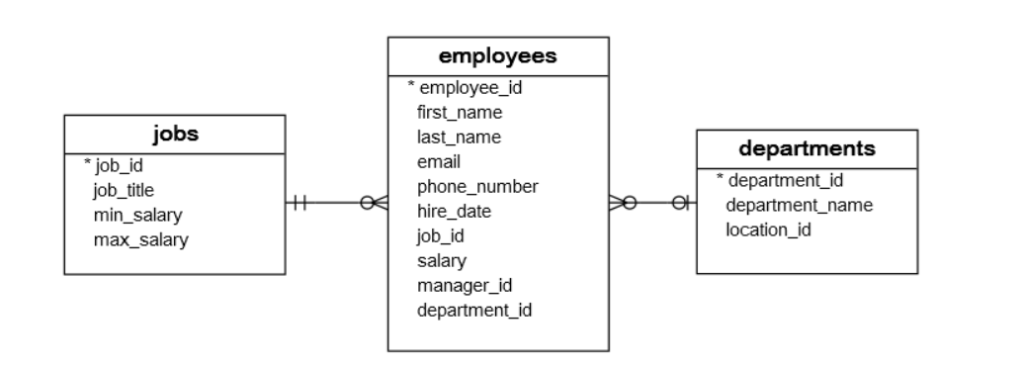
And select the first name, last name, job title, and department name of all employees:
SELECT
  first_name,
  last_name,
  job_title,
  department_name
FROM
  employees e
  INNER JOIN departments d ON d.department_id = e.department_id
  INNER JOIN jobs j ON j.job_id = e.job_id
ORDER BY
  first_name,
  last_name;
Try it here:
 first_name  |  last_name  |            job_title            | department_name
-------------+-------------+---------------------------------+------------------
 Adam        | Fripp       | Stock Manager                   | Shipping
 Alexander   | Hunold      | Programmer                      | IT
 Alexander   | Khoo        | Purchasing Clerk                | Purchasing
 Britney     | Everett     | Shipping Clerk                  | Shipping
 Bruce       | Ernst       | Programmer                      | IT
...
Summary
- Use SQL
INNER JOINclause to merge rows from two tables based on a condition.
📝 SQL JOIN Quiz
10 questions · Free practice quiz

