
Summary: in this tutorial, you will learn how to use the SQL IN operator to check if a value is in a set of values.
Introduction to SQL IN Operator
The IN is one of the logical operators in SQL. The IN operator returns true if a value is in a set of values or false otherwise.
Here’s the syntax of the IN operator:
expression IN (value1, value2,...)Technically, you can substitute the IN operator with the equal to(= ) and OR operators. In other words, you can rewrite the IN operator using one or more OR operators like this:
expression = value1 OR expression = value2 OR ...The NOT IN operator negates the result of the IN operator. Here’s the syntax of the NOT IN operator:
expression NOT IN (value1, value2,...)The NOT IN operator returns true if the expression does not equal any values in the list (value1, value2, …) or false otherwise.
Technically, you can rewrite the NOT IN operator using the not equal to (!= ) and AND operators as follows:
expression != value1 AND expression != value2 AND...Notice that if any value in the list (value1,value2,...) is NULL, the IN operator returns no rows.
In practice, you often use the IN and NOT IN operators in the WHERE clause of the SELECT statement to filter rows with a value in a set of values.
Later, you’ll learn how to use the IN and NOT IN operator with subqueries.
SQL IN operator examples
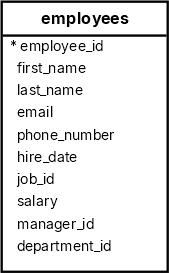
We will use the employees table in the sample database to demonstrate the functionality of the IN operator.
Using the IN operator with numeric data
The following example uses the IN operator to find employees with the job id is 8, 9, or 10:
SELECT
  first_name,
  last_name,
  job_id
FROM
  employees
WHERE
  job_id IN (8, 9, 10)
ORDER BY
job_id; first_name | last_name | job_id
------------+-----------+--------
Susan | Mavris | 8
Bruce | Ernst | 9
David | Austin | 9
Alexander | Hunold | 9
Diana | Lorentz | 9
Valli | Pataballa | 9
Michael | Hartstein | 10The following example uses the NOT IN operator to find employees with the job id is not 7, 8, or 9:
SELECT
  first_name,
  last_name,
  job_id
FROM
  employees
WHERE
  job_id NOT IN (7, 8, 9)
ORDER BY
job_id; first_name | last_name | job_id
-------------+-------------+--------
William | Gietz | 1
Shelley | Higgins | 2
Jennifer | Whalen | 3
Steven | King | 4
Neena | Kochhar | 5
Lex | De Haan | 5
Jose Manuel | Urman | 6
Luis | Popp | 6
John | Chen | 6
Ismael | Sciarra | 6
Daniel | Faviet | 6
Michael | Hartstein | 10Using the IN operator with character data
The following query uses the IN operator to retrieve employees whose first name is either Steven, Lex, or Daniel:
SELECT
  first_name,
  last_name
FROM
  employees
WHERE
first_name IN ('Steven', 'Lex', 'Daniel');Output:
 first_name | last_name
------------+-----------
 Steven     | King
 Lex        | De Haan
 Daniel     | Faviet
Using the IN operator with date values
The following statement uses the IN operator to retrieve employees who joined the company on one of these dates: 1987-06-17 , 1994-08-16 , and 1997-09-30:
SELECT
  first_name,
  last_name,
  hire_date
FROM
  employees
WHERE
hire_date IN ('1987-06-17', '1994-08-16', '1997-09-30');Output:
 first_name | last_name | hire_date
------------+-----------+------------
 Steven     | King      | 1987-06-17
 Daniel     | Faviet    | 1994-08-16
 Ismael     | Sciarra   | 1997-09-30
Using the IN operator with a function
The following query uses the EXTRACT function to extract month from the hire_date column and the IN operator to retrieve employees who joined the company in January, February, or March:
SELECT
  first_name,
  last_name,
  hire_date,
  EXTRACT(MONTH FROM hire_date) joined_month
FROM
  employees
WHERE
  EXTRACT(MONTH FROM hire_date) IN (1, 2, 3)
ORDER BY
joined_month; first_name | last_name | hire_date | joined_month
-------------+-----------+------------+--------------
Lex | De Haan | 1993-01-13 | 1
Alexander | Hunold | 1990-01-03 | 1
Karen | Partners | 1997-01-05 | 1
Charles | Johnson | 2000-01-04 | 1
Michael | Hartstein | 1996-02-17 | 2
Sarah | Bell | 1996-02-04 | 2
Valli | Pataballa | 1998-02-05 | 2
Diana | Lorentz | 1999-02-07 | 2
Britney | Everett | 1997-03-03 | 3
Jonathon | Taylor | 1998-03-24 | 3
Jose Manuel | Urman | 1998-03-07 | 3Summary
- Use the
INoperator to check if a value is in a set of values. - Use the
NOToperator to negate theINoperator.
