Summary: In this tutorial, you’ll learn how to use SQL subqueries to form flexible queries for retrieving data from the database.
Introduction to SQL subquery
A subquery is an SQL query nested inside another query. The query that contains a subquery is known as an outer query.
To write a subquery, you need to have a deep understanding of the SELECT statement:
SELECT
  select_list
FROM
  table1
  INNER JOIN table2 ON join_condition
WHERE
  filter_condition;
Note that the join can be
INNER JOIN,LEFT JOIN,RIGHT JOIN, orFULL JOIN.
In this syntax:
- The
SELECTclause can accept a single value, which can be a column or an expression. - The
FROMandINNER JOINclauses can accept a result set such as a table. - The
WHEREcan accept a single value, which can be a column or an expression.
Based on the shape of the data each clause accepts, you can embed the appropriate subquery:
- The subquery in the
SELECTclause can return a single value. - The subquery in the
FROMorINNER JOINclauses can return a result set. - The subquery in the
WHEREclause can return a single value.
SQL subquery in the WHERE clause
We’ll use the employees table from the HR sample database:
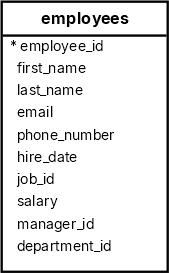
The following statement uses a subquery to find the employees who have the highest salary:
SELECT
  first_name,
  salary
FROM
  employees
WHERE
  salary = (
    SELECT
      MAX(salary)
    FROM
      employees
  );
Output:
 first_name |  salary
------------+----------
 Steven     | 24000.00
How the query works.
First, the subquery returns the max salary from the salary column of the employees table:
SELECT
  MAX(salary)
FROM
  employees
Second, the outer query uses the value returned by the subquery and returns the employee with the highest salary.
The following example uses a subquery to find employees with a salary greater than the average salary:
SELECT
  first_name,
  salary
FROM
  employees
WHERE
  salary > (
    SELECT
      AVG(salary)
    FROM
      employees
  )
ORDER BY
  salary;
Output:
 first_name |  salary
------------+----------
 John       |  8200.00
 Adam       |  8200.00
 William    |  8300.00
 Jack       |  8400.00
 Jonathon   |  8600.00
...
SQL Subquery with the IN operator
The IN operator returns true if a value equals any value in a list of values. You can use a subquery to return a list of values for the IN operator:
IN subqueryFor example, the following query uses a subquery with the IN operator to find all employees with the job titles related to Sales:
SELECT
  first_name,
  last_name
FROM
  employees
WHERE
  job_id IN (
    SELECT
      job_id
    FROM
      jobs
    WHERE
      job_title LIKE '%Sales%'
  );
Output:
 first_name | last_name
------------+------------
 John       | Russell
 Karen      | Partners
 Jonathon   | Taylor
 Jack       | Livingston
 Kimberely  | Grant
 Charles    | Johnson
How the query works.
First, the subquery returns a list of job IDs with the job titles have the word "Sales":
SELECT
  job_id
FROM
  jobs
WHERE
  job_title LIKE '%Sales%'
Output:
 job_id
--------
     15
     16
Second, the outer query selects the employees with the job_id in the job id list (15, 16).
Subquery in the SELECT clause
The following example uses a subquery in the SELECT clause to retrieve the first name, salary, and average salary of all employees:
SELECT
  first_name,
  salary,
  (
    SELECT
      ROUND(AVG(salary),2) average_salary
    FROM
      employees
  )
FROM
  employees
ORDER BY
  salary;
Try it
 first_name  |  salary  | average_salary
-------------+----------+----------------
 Karen       |  2500.00 |        8060.00
 Guy         |  2600.00 |        8060.00
 Irene       |  2700.00 |        8060.00
 Sigal       |  2800.00 |        8060.00
 Shelli      |  2900.00 |        8060.00
...
Subquery in the FROM clause
The following example shows how to use a subquery in the FROM clause:
SELECT
  ROUND(AVG(department_salary), 0) average_department_salary
FROM
  (
    SELECT
      department_id,
      SUM(salary) department_salary
    FROM
      employees
    GROUP BY
      department_id
  );
Output:
 average_department_salary
---------------------------
                     29309
How it works.
First, the subquery returns a result set that includes department_id and total salary for each department:
SELECT
  department_id,
  SUM(salary) department_salary
FROM
  employees
GROUP BY
  department_id;
Second, the outer query calculates the average total salary of all departments and rounds it off with zero decimal places.
Subquery in the INNER JOIN clause
The following example uses a subquery in the INNER JOIN clause of the outer query to retrieve employees who earn above the company’s average salary:
SELECT
  first_name,
  last_name,
  salary,
  s.avg_salary
FROM
  employees e
  INNER JOIN (
    SELECT
      ROUND(AVG(salary), 0) AS avg_salary
    FROM
      employees
  ) s ON e.salary > s.avg_salary
ORDER BY
  salary;
Output:
 first_name | last_name  |  salary  | avg_salary
------------+------------+----------+------------
 John       | Chen       |  8200.00 |       8060
 Adam       | Fripp      |  8200.00 |       8060
 William    | Gietz      |  8300.00 |       8060
 Jack       | Livingston |  8400.00 |       8060
 Jonathon   | Taylor     |  8600.00 |       8060
...
How the query works.
- First, the subquery calculates the company’s average salary.
- Second, the outer query retrieves employees earning above that average salary.
Summary
- A subquery is a query nested in an outer query.
- Embed an appropriate subquery in the
SELECT,FROM,WHERE, andINNER JOINclauses of a query.