
Summary: in this tutorial, you will learn how to use the SQL LIKE operator to test whether a value matches a pattern.
Introduction to SQL LIKE operator
The LIKE operator is one of the SQL logical operators. The LIKE operator returns true if a value matches a pattern or false otherwise.
Here’s the syntax of the LIKE operator:
expression LIKE patternCode language: SQL (Structured Query Language) (sql)In this syntax, the LIKE operator tests whether the expression matches the pattern.
SQL provides you with two wildcard characters to construct a pattern:
-
%percent wildcard matches zero, one, or more characters -
_underscore wildcard matches a single character.
When you use the wildcard characters in a string, SQL will treat them specially.
The following table shows an example of using the % and _ wildcard characters:
| Expression | Meaning |
|---|---|
LIKE 'Kim%' | match a string that starts with Kim |
LIKE '%er' | match a string that ends with er |
LIKE '%ch%' | match a string that contains ch |
LIKE 'Le_' | match a string that starts with Le and is followed by one character e.g., Les, Len… |
LIKE '_uy' | match a string that ends with uy and is preceded by one character e.g., guy |
LIKE '%are_' | match a string that includes the string are and ends with one character. |
LIKE '_are%' | match a string that includes the string are, starts with one character and ends with any number of characters. |
Note that besides the % and _ wildcards, some database systems may support additional wildcard characters.
NOT LIKE
To negate the result of a LIKE operator, you use the NOT operator:
expression NOT LIKE patternCode language: SQL (Structured Query Language) (sql)The NOT LIKE operator returns true if the expression doesn’t match the pattern or false otherwise.
Escape character
To match a string that contains wildcard characters for example 10%, you need to instruct the LIKE operator to treat the % in 10% as a regular character.
To do that, you can explicitly specify an escape character after the ESCAPE clause:
expression LIKE pattern ESCAPE escape_characterCode language: SQL (Structured Query Language) (sql)For example:
value LIKE '%10!%%' ESCAPE '!'Code language: SQL (Structured Query Language) (sql)In this example, the ! is an escape character which instructs the LIKE operator to treat the % appear immediately after it as a regular character.
In practice, you often use the LIKE operator in WHERE clause to filter rows whose values match a pattern. Additionally, you can use the LIKE operator in the WHERE clause of the UPDATE and DELETE to filter rows to update and delete.
SQL LIKE operator examples
We’ll use the employees table in the sample database for the demonstration.
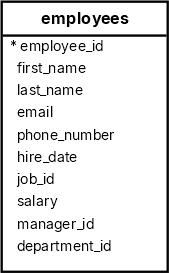
Finding names starting with a string
The following query uses the LIKE operator to find all employees with the first names starting with the string Da :
SELECT
  first_name,
  last_name
FROM
  employees
WHERE
  first_name LIKE 'Da%'
ORDER BY
first_name; first_name | last_name
------------+-----------
Daniel | Faviet
David | AustinFinding names ending with a string
The following statement uses the LIKE operator to find employees whose first names end with er:
SELECT
  first_name,
  last_name
FROM
  employees
WHERE
  first_name LIKE '%er'
ORDER BY
first_name; first_name | last_name
------------+-----------
Alexander | Hunold
Alexander | Khoo
Jennifer | WhalenFinding names that include a string
The following query uses the LIKE operator to find employees whose first names contain the word an:
SELECT
  first_name,
  last_name
FROM
  employees
WHERE
  first_name LIKE '%an%'
ORDER BY
first_name; first_name | last_name
-------------+-----------
Alexander | Khoo
Alexander | Hunold
Daniel | Faviet
Diana | Lorentz
Hermann | Baer
Jose Manuel | Urman
Nancy | Greenberg
Shanta | Vollman
Susan | MavrisUsing the _ wildcard character
The following query uses the LIKE operator to find employees whose first names start with Jo and are followed by two characters:
SELECT
  first_name,
  last_name
FROM
  employees
WHERE
  first_name LIKE 'Jo__'
ORDER BY
first_name; first_name | last_name
------------+-----------
John | Chen
John | RussellCombining wildcard characters
The following query uses the LIKE operator with the % and _ wildcard characters to find employees whose first names start with any number of characters and are followed by a single character:
SELECT
  first_name,
  last_name
FROM
  employees
WHERE
  first_name LIKE '%are_'
ORDER BY
first_name; first_name | last_name
------------+------------
Karen | Colmenares
Karen | PartnersSQL NOT LIKE operator example
The following example uses the NOT LIKE operator to find all employees whose first names start with the letter S but not start with Sh:
SELECT
  first_name,
  last_name
FROM
  employees
WHERE
  first_name LIKE 'S%'
  AND first_name NOT LIKE 'Sh%'
ORDER BY
first_name; first_name | last_name
------------+-----------
Sarah | Bell
Sigal | Tobias
Steven | King
Susan | MavrisSummary
- The
LIKEoperator returnstrueif a value matches a pattern orfalseotherwise. - Use the
NOToperator to negate theLIKEoperator. - Use the
%wildcard to match one or more characters - Use the
_wildcard to match a single character.
